Introduction
Best easy-to-use remote controls for seniors in New Zealand can make watching TV, streaming shows, and using home entertainment devices much simpler. Many modern remote controls have too many small buttons, confusing menus, or hard-to-read labels.
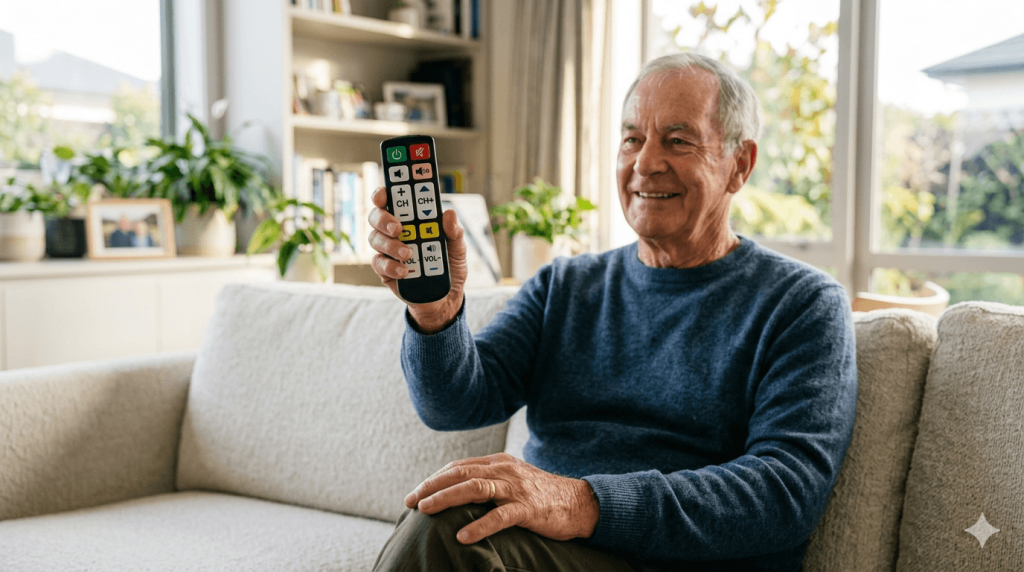
For older adults, a simple large-button remote can reduce frustration and make daily entertainment easier to enjoy. The best options are clear, comfortable to hold, and easy to understand.
In this guide, we look at the most important features to consider when choosing an easy-to-use remote control for seniors.
Why Simple Remote Controls Are Helpful for Seniors
Television is still an important part of daily life for many seniors. It provides news, entertainment, relaxation, and connection to the outside world.
However, modern remotes can sometimes be confusing. Small buttons, similar-looking symbols, and complex smart TV features can make basic tasks harder than they should be.
A senior-friendly remote control may help with:
- Turning the TV on and off more easily
- Changing channels without confusion
- Adjusting volume quickly
- Using fewer unnecessary buttons
- Reducing accidental button presses
- Making TV time more relaxing
For many households, replacing a complicated remote with a simpler one can make a noticeable difference.
Best Easy-to-Use Remote Controls for Seniors in New Zealand: Key Features
Large Buttons
Large buttons are one of the most important features.
They are easier to see and easier to press, especially for seniors with reduced vision, arthritis, or reduced hand strength.
Clear Labels
Buttons should have simple, easy-to-read labels.
Look for remotes with clear words or symbols for common functions such as power, volume, channel, mute, and menu.
Simple Layout
A good senior-friendly remote should not have too many buttons.
For many seniors, the most useful buttons are:
- Power
- Volume up and down
- Channel up and down
- Mute
- Number buttons
- Input or source button
Too many extra buttons can make the remote more confusing.
Comfortable Grip
The remote should feel comfortable in the hand.
A slightly larger remote may be easier to hold than a very small one. Rounded edges and a non-slip surface can also help.
Easy Setup
Some universal remotes require programming before they work with a TV.
When choosing a remote, check whether it is compatible with the TV brand and whether setup is simple enough for the user or a family member to manage.
Types of Easy-to-Use Remote Controls
Large-Button TV Remotes
These remotes are designed with bigger buttons and fewer functions.
They are usually a good choice for seniors who mostly use basic TV features.
Universal Remote Controls
Universal remotes can work with different TV brands and devices.
They can be useful, but setup may be more complicated. A family member may need to help with programming.
Simplified Smart TV Remotes
Some remotes are designed for smart TVs and streaming devices, but still keep a simple layout.
These may be suitable for seniors who watch streaming services but do not want a complicated controller.
Remote Controls With Backlit Buttons
Backlit buttons can help in darker rooms.
This can be useful for evening TV watching, especially if the labels are still easy to read.
Common Mistakes When Buying a Remote Control
When choosing a remote control for seniors, avoid these common mistakes:
- Buying a remote with too many small buttons
- Choosing a model that is difficult to program
- Ignoring TV compatibility
- Choosing labels that are too small
- Buying a remote that is too small to hold comfortably
- Assuming all universal remotes are easy to use
The best remote is not always the most advanced one. For seniors, simplicity is often more important.
Who Should Consider an Easy-to-Use Remote Control?
An easy-to-use remote control may be suitable for seniors who:
- Struggle with small buttons
- Often press the wrong button by accident
- Find smart TV remotes confusing
- Mainly need basic TV functions
- Prefer simple physical controls
- Want a more comfortable TV experience
It can also be a useful gift for older parents or grandparents who still enjoy watching television but dislike complicated technology.
Extra Tips for Making TV Easier to Use
A simple remote control works best when the whole TV setup is easy to understand.
Helpful steps may include:
- Removing unused remotes from the coffee table
- Writing down simple instructions
- Keeping the remote in the same place
- Setting favourite channels
- Reducing unnecessary smart TV apps
- Using larger on-screen text where possible
Small changes can make the TV experience much more comfortable for seniors.
Final Recommendation
The best easy-to-use remote controls for seniors in New Zealand should have large buttons, clear labels, a simple layout, and a comfortable grip.
For most seniors, a large-button remote with only the most important functions is the most practical choice. It can reduce confusion and make watching TV more enjoyable.
A good remote control should make technology feel easier, not harder.
For seniors who want other simple technology tools, our guide to large print keyboards may also be helpful.
For general digital support and learning resources, visit Digital Inclusion Alliance Aotearoa.